THE APP
The UP↑SCALE app: your scale gets a brain
Put something on the scale and see everything at once: the weight, the calories, the mg of THC, the price, the lot. Log every step, split a batch into exact portions, watch your process in charts and keep records anybody can check. On your phone, tablet or computer.
An app that is different
Most apps for scales want your e-mail, show you adverts or cost something every month. Ours is made for good: it works offline for ever, shows no adverts (not even in the free version), sets no cookies and tracks nothing, needs no subscription (you can pay once) and no account, login or e-mail - and your data stays yours, on your scale.
And it can do amazing things. Here is a short overview:
Weigh it - and see what it means
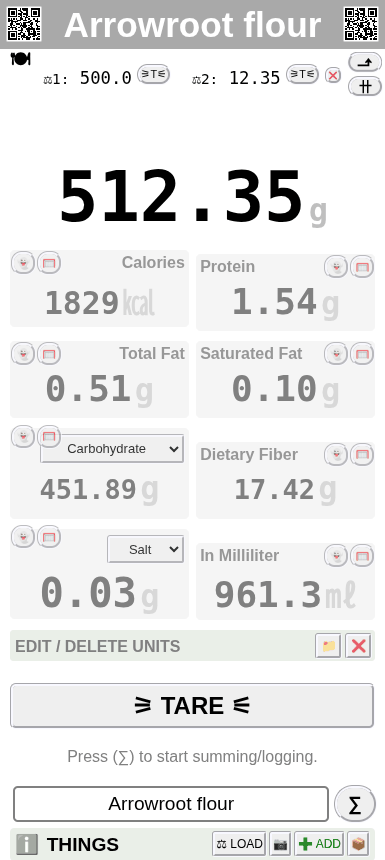
A number in grams is only the start. Save your products as THINGS on the scale, and the app shows their values live with the weight: up to 20 units per THING.
- Food: calories, protein, fat, carbohydrates, fibre and salt - from your own values or the food database (also by barcode).
- Infused products: mg of THC or CBD from the strength of your oil, butter or distillate, the parts of a mix, the volume in ml - and the lot it came from.
- Your own units: prices, pieces, cups, spoons, bread units, jars - whatever you count in.
- Every value follows the weight while you fill up or take away. Tare, hold, take-away mode and labels are one tap away.
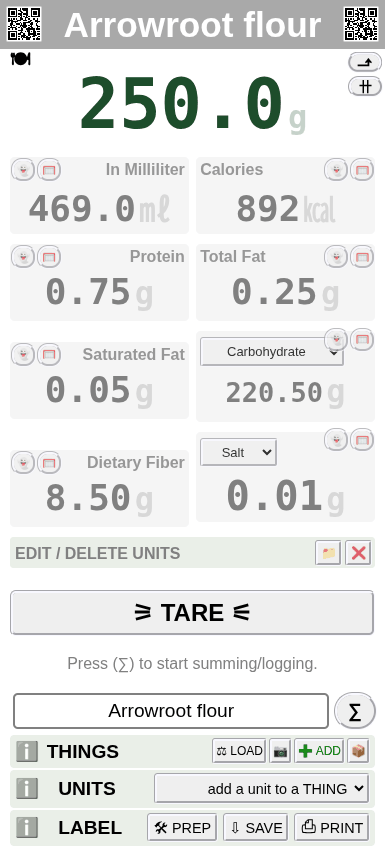
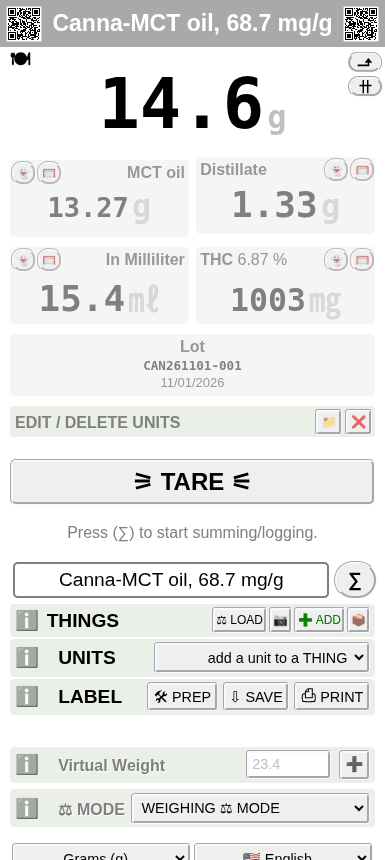
Weigh in your unit - even in teaspoons
Grams are only one choice. Pick the weight unit you sell or cook in, and every value of the THING follows it.
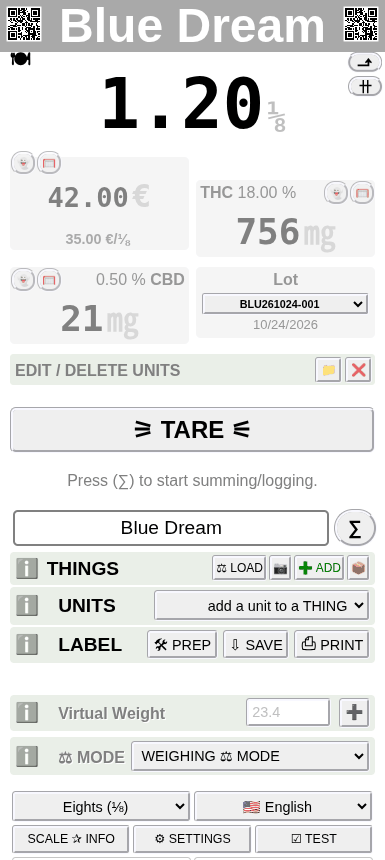
- 14 weight units: grams, kilograms, milligrams, micrograms, tonnes, ounces, pounds, eighths (⅛), troy ounces, carats, grains, tolas, pennyweights - and, for fun, giraffes per football field.
- The price follows the unit: 4.2 g of Blue Dream are 1.20 ⅛ - at 35.00 € per ⅛ that is 42.00 €, with 756 mg THC.
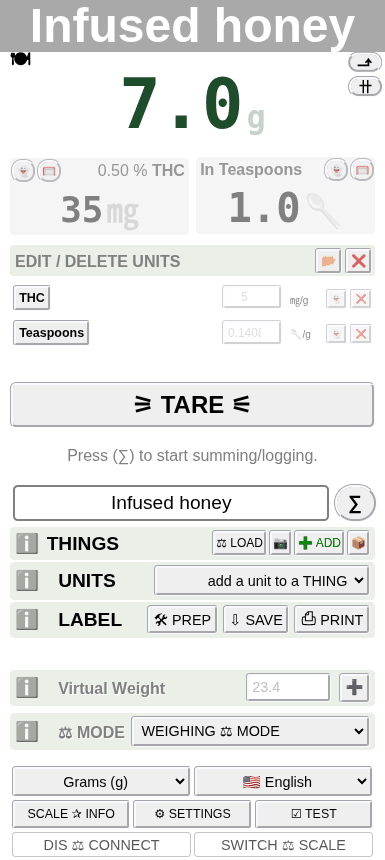
- Weigh directly in cups and spoons: add the unit WEIGHT ↔ VOLUME, pick your product from the list of more than 300 densities (liquids, oils, honey, flours, sugars and much more from the kitchen and the lab - or type your own) and choose teaspoons, dessertspoons, tablespoons, US or imperial cups or ml.
- Then pour the honey onto the scale: 7 g are 1 teaspoon - and with the THC of your infused honey on the same THING, the scale shows 35 mg THC per teaspoon. No measuring spoons, nothing sticky left in the spoon.
THINGS: your products, saved on the scale
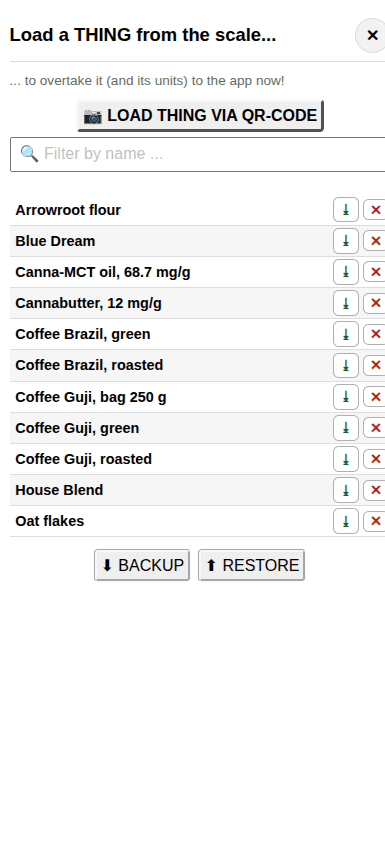
A THING is one of your products with all its units. It is saved on the scale itself - so every phone and computer you connect finds the same list.
- Load it with one tap, by its name or by scanning its QR code - and its units are on the weighing page at once.
- 11 kinds of units: price, ingredients, cannabinoids, the infusion calculator, food nutrition values, weight ↔ volume, the hydration of a dough, percent weighing, your own units, the lot number and the weight of the container.
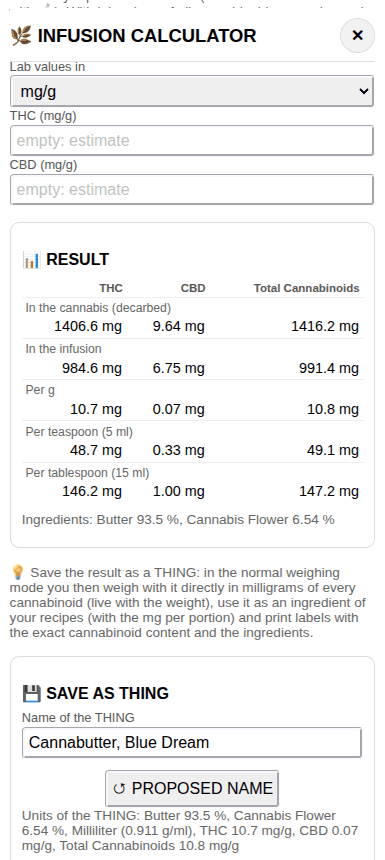
- The infusion calculator turns the lab label of your cannabis into the mg per g of your butter, oil or tincture - and saves the result as a THING to weigh with.
- Back up and restore all THINGS as a file. FREE: a few THINGS, PRO: up to 1000. More: THINGS and all units →
Recipes: weighed step by step
Save your recipes on the scale and let it guide you through every ingredient - in any batch size.
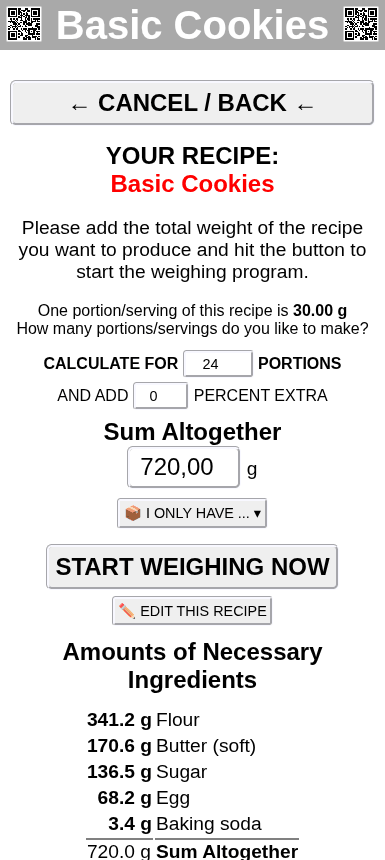
- Enter a recipe in grams, in percent or in baker's percentages - and make it for any number of portions or any total weight: 24 cookies → 720 g, every amount worked out.
- "I only have ...": tell the app how much you have of one ingredient, and the whole recipe follows it.
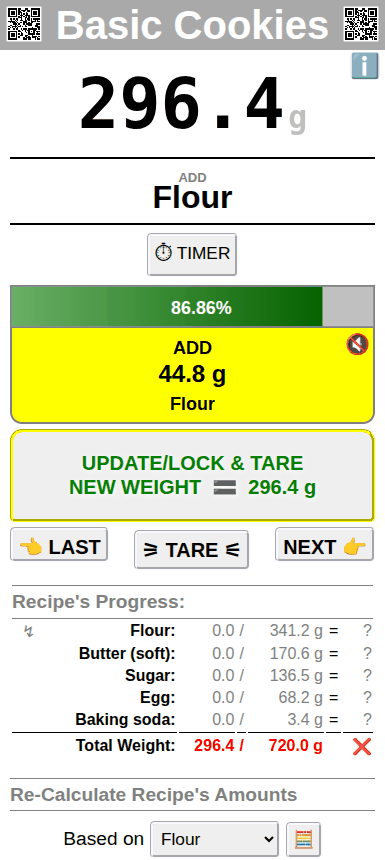
- While you weigh, it shows what to add next, how much is still missing and when the ingredient is within its tolerance - with a progress bar and a sound.
- Use a THING like your cannabutter as an ingredient, and the recipe knows the mg of THC per portion. Allergens, nutrition values, costs and margin, portions and labels come with it.
- FREE: a few recipes, PRO: up to 250 on the scale, each with up to 50 ingredients.
Many scales, one app: the butler scales
Connect more scales to the same app - a big one for the flour, a fine one for the yeast, salt and spices - and weigh on all of them at once.
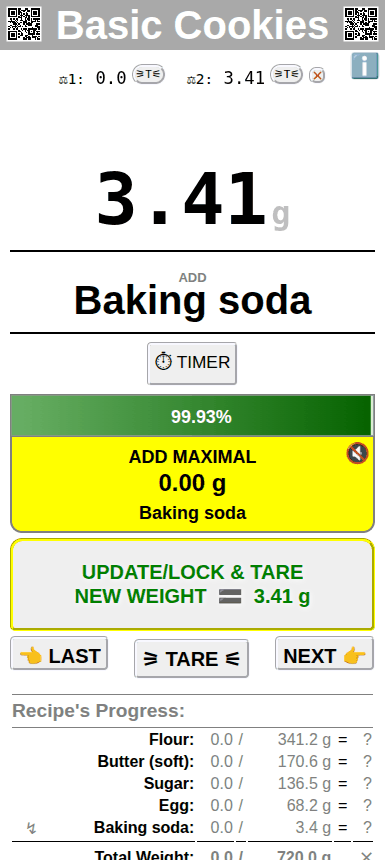
- Every scale shows its own weight and has its own tare button at the top; the big number is the sum of all scales.
- Works in the weighing mode (with all the values of your THING), in the recipes and in counting, check-weighing and sorting - also with different weight units and decimals.
- A bakery example: the dough on the floor scale, the 3.4 g of baking soda on the fine scale - the recipe takes the step from whichever scale it is on.
- Mix your scales: our own scales, your old RS-232 scales with an UP↑SCALE adapter. FREE: 1 extra scale, PRO: more.
The weighing log: every step, added up
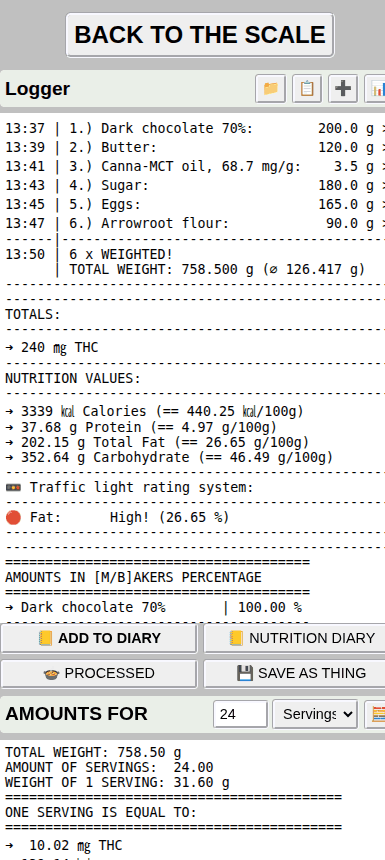
Press ∑ after each ingredient. The app writes the time, the name, the weight, the lot and every value of the THING into the weighing log - and adds it all up for you.
- Totals of the whole batch: here 240 mg of THC in a tray of brownies, plus calories, protein, fat and carbohydrates - also per 100 g.
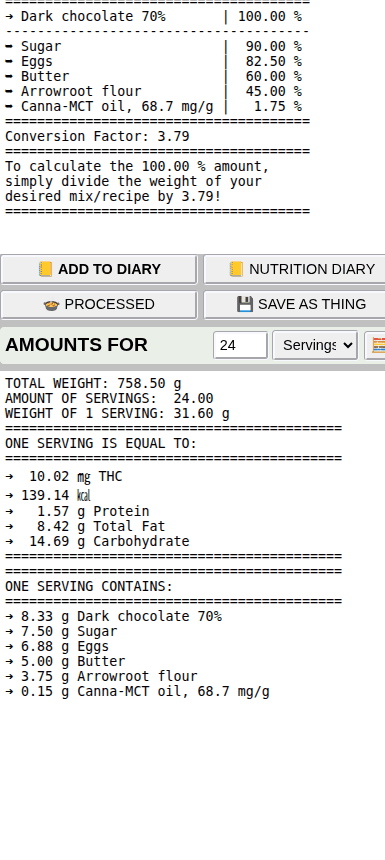
- Traffic light for fat, sugar and salt, and the baker's percentages of the recipe (scale it up or down in a second).
- Copy it, put it into your nutrition diary - or save the batch as a new THING and weigh portions of it later.
- Several logs side by side: one per batch, per day or per customer.
The portions calculator: exact doses, no guessing
Below the log, tell the app how you want to split the batch - and it tells you how heavy one portion has to be.
- By the number of portions: 24 brownies → 31.6 g each, with 10.0 mg THC in every piece.
- By a value: "10 mg THC per piece", "200 kcal per serving" or "50 g per bag" - the app works out the weight and how many you get.
- It also shows what one portion contains: how much chocolate, sugar, butter, oil ... - handy for labels and allergens.
- Save the batch as a THING, and every piece you weigh shows its mg THC and calories live.
Filling and check-weighing: right to the gram
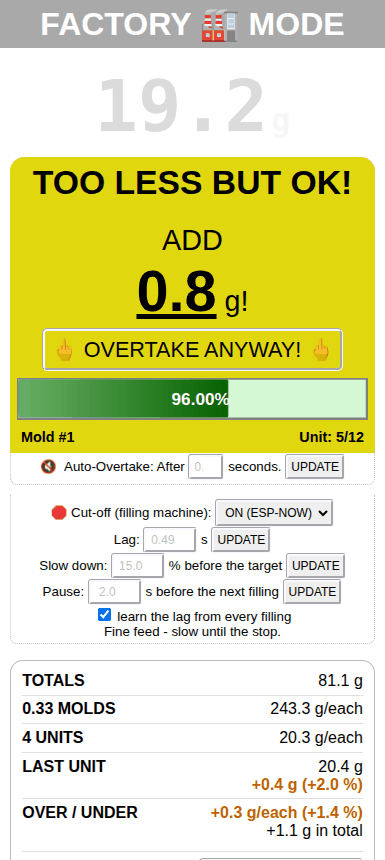
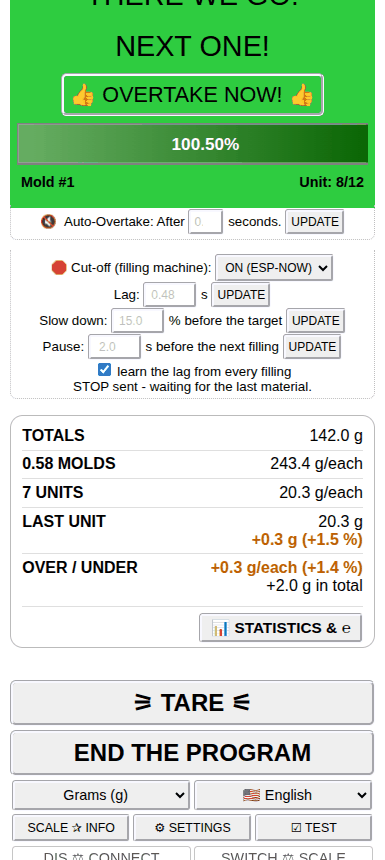
Fill molds, bags and jars one after the other: the app shows in color what to add or take away - and counts, tares and adds everything up by itself.
- 🏭 Factory mode: molds with up to 255 cavities, a PERFECT and an OK range, auto overtake and tare - and the over- or under-filling of the last unit and of all of them.
- 🛑 Your filling machine: valves, pumps and augers over encrypted ESP-NOW radio - a cut-off that learns your machine and never underfills, coarse / fine dosing, a pause to move the mold, and the step of the program from START to the end.
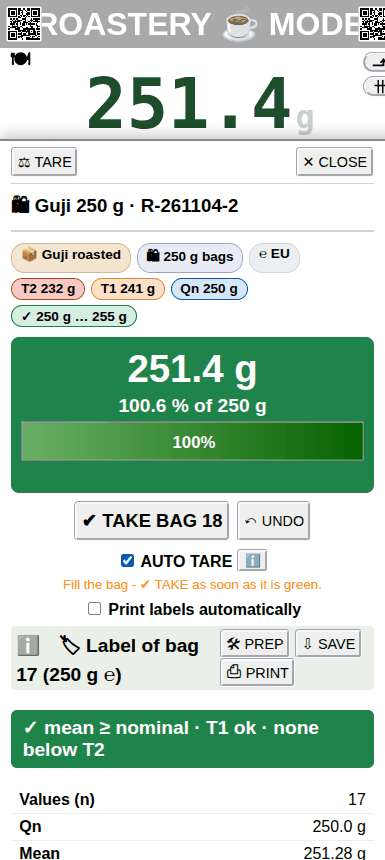
- 🛍 Fill weighing: bags out of a bulk THING with the ℮ or the NIST HB 133 rules and live statistics.
- Check-weighing against a target, with OK and PERFECT range. The same colors everywhere: orange too less, yellow OK, green PERFECT, red too much.
Statistics: see how good your process really is
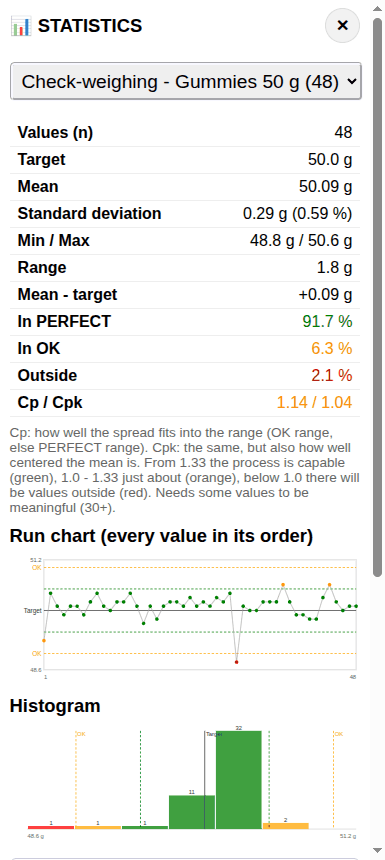
Every check-weighing, filling or sorting run - and every weighing log - becomes a statistic with one tap.
- Mean, standard deviation, min / max, how many were perfect, OK or outside, and Cp / Cpk.
- A run chart with every value in its order - the one underweight bag stands out at once - and a histogram.
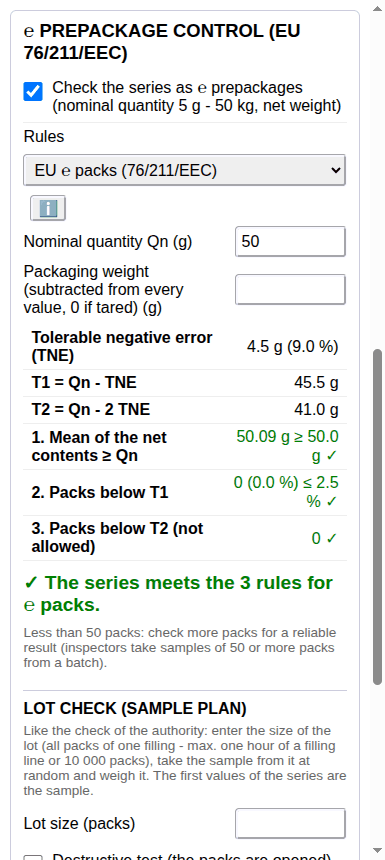
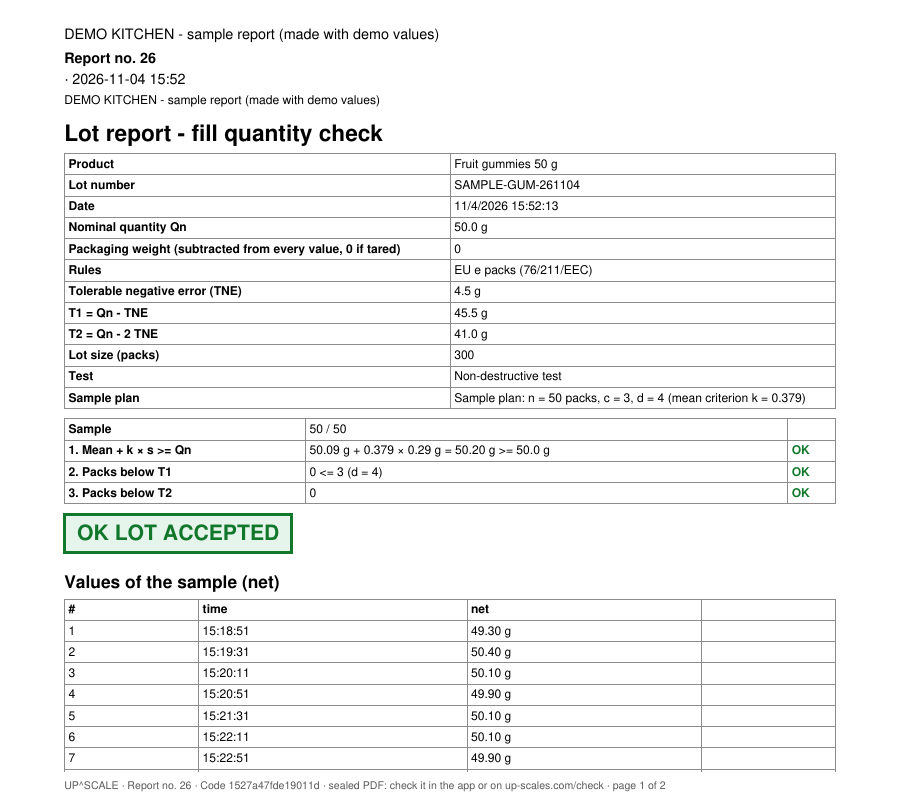
- The ℮ prepackage control checks a series against the EU rules for ℮ packs (also the US rules of NIST Handbook 133), with a lot report for your files.
- Download the values as CSV for Excel - or print the report.
Stock, lots and bags: from the bulk to the bag
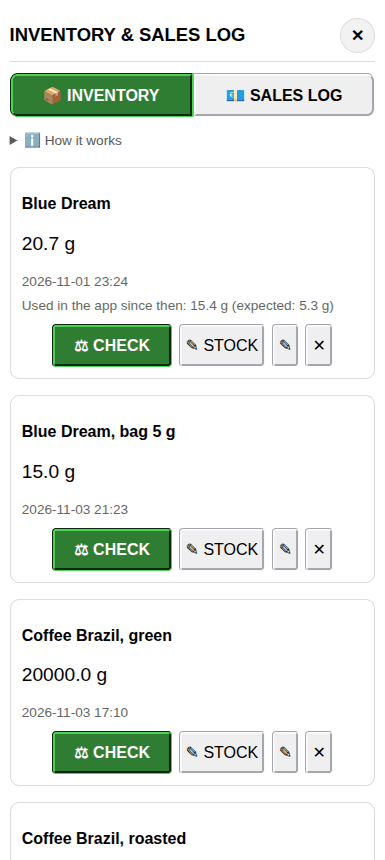
The scale keeps your stock, your lots and your sales - so the numbers are the same on every phone and computer you connect.
- 📦 Stock by weight: weigh the jar or sack - you see what is left, what should be left and the loss.
- 🧾 Lots: a lot store of 420 lots with use-by date, price and status - on the labels, in the log and the reports.
- 🛍 Fill weighing: from the bulk into bags of 250 g, green when the bag is right, with the overfill you give away.
- 💶 Sales log: revenue, costs, profit and margin - by THING, day or user.
Labels with the live weight
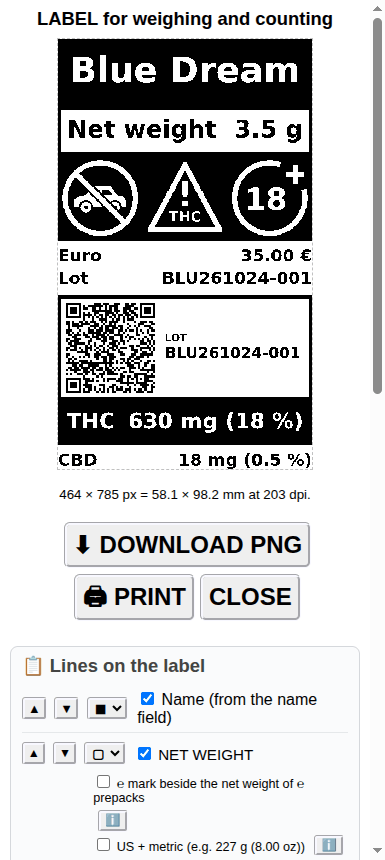
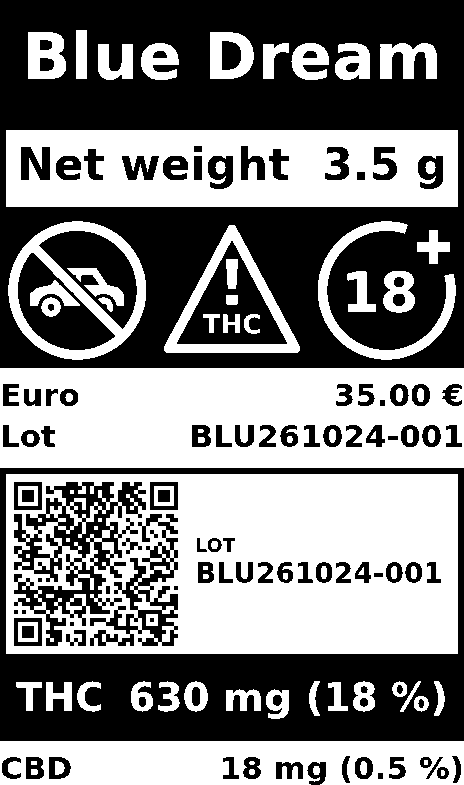
Put the product on the scale and press PRINT: the label carries the weight and every value calculated with it - right now, no typing.
- Set it up once (🛠 PREP): name, net weight, price and price per kg, the lot with its QR code, THC / CBD, nutrition values, the ingredients with the allergens marked, your business, own texts, a picture, an EAN-13 barcode and the cannabis warning.
- Move the lines, make them small, bold, framed or inverted, and choose the size of your label.
- Save it as an image (FREE) - or print it straight on your label printer (PRO).
- Recipes, portions and fill weighing print their own labels, too.
Tracking: the scale watches, the app tells you
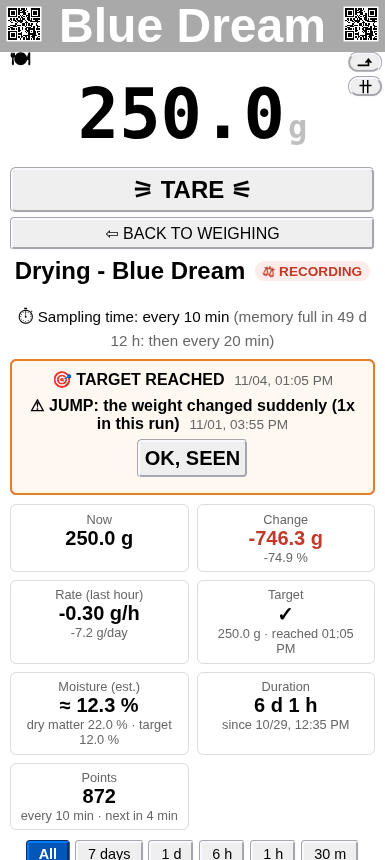
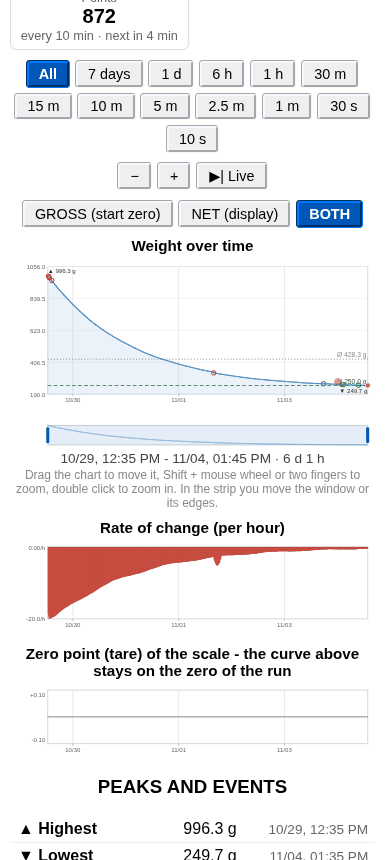
Drying, curing, fermenting, a sourdough starter, a beehive, a silo: the scale records the weight on its own - for days or weeks, even while your phone is off - and the app shows the whole story when you come back.
- Alarms: target weight reached, constant weight, a sudden jump, peaks, leaving a band around the average - with sound, vibration and a note on your screen.
- Drying with a goal: enter the dry matter and the final moisture you want, and the app shows the estimated moisture and when the target is reached.
- Charts of the weight and the rate of change, zoom from weeks down to seconds, gross and net, the events of the run and a CSV export.
- FREE: 15 minutes in a row, then a short pause. PRO: without pauses.
Sealed reports: records that show if anyone changed them
Lot reports, solution and compounding reports, sales and stock reports, the activity log: save them as PDF, and the scale itself seals the file with its own digital key. Change one number later - and the check shows it.
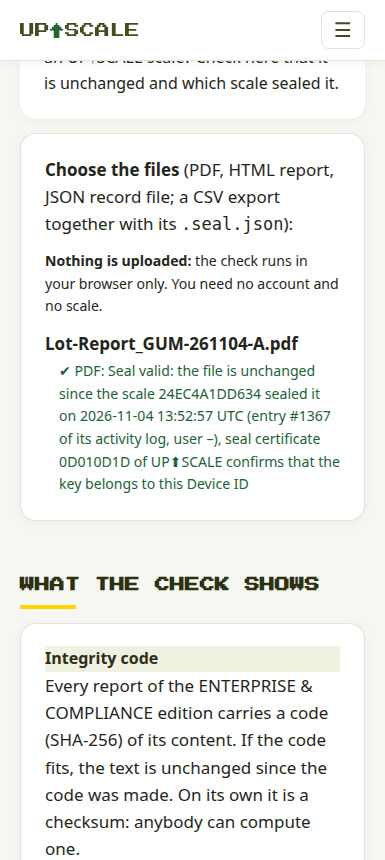
- Check it yourself, free: drop the file onto up-scales.com/check - the check runs in your browser, nothing is uploaded, no account needed.
- Try it now: download our sample sealed report (demo values) and check it - then try the same report with one value changed: the underweight bag 48.80 g turned into 49.80 g, and the check says SEAL NOT VALID.
- The report carries its number, an integrity code and the data of the scale; the seal says which scale sealed it and when.
- Tamper-evident, not write-once: a changed or deleted file can't go unnoticed - keep your files in a safe place. More in security in plain words.
And much more in the same app
One app, more than 35 jobs - switch the job, not the scale.
- Counting pieces, counting on several scales and sorting into weight classes
- Coffee with timer, flow rate and pour-over guidance; 600+ cocktails to weigh instead of measure
- A nutrition diary for the family, carbohydrate units for diabetics, food by barcode and recipes from websites
- The sales, cannabis club and roastery modes: the scale as a sales display, with the club records and the trace from the bag to the green coffee
- Density of liquids and solids, a gold calculator with karat and spot price, standard solutions and a compounding assistant for pharmacies
- The routine check before use, the self-check of your scale and the test suite of OIML R 76 with a final report
- Users with roles, an activity log on the scale and the data sent to your lab system (ENTERPRISE & COMPLIANCE)
- Many phones on one scale, all on the same numbers - and the values sent on over USB to your scale software, or to displays and machines (ESP-NOW)
- Back up your THINGS and recipes, or sync them to your other scales; in English, German and Spanish
How it works
- No app store, no installation: the app runs in your browser and talks to the scale over Bluetooth. Add it to your home screen, and it works like an installed app - also offline.
- Your data stay with you: weights, THINGS, logs and records are kept on your scale and in your browser. No account, no cloud, no tracking, no adverts.
- Works on Android phones and tablets and on computers (Windows, Linux, macOS, ChromeOS) in Chrome, Edge or Opera (depending on the browser, one setting to switch on); on iPhone and iPad with a Bluetooth browser app. The setup page shows how.
- Free to start: the FREE version has no time limit. PRO and ENTERPRISE & COMPLIANCE unlock more - and you can try everything for free first.
The screenshots show the real app with demo values (products, weights and the company on the report are examples). The app gets new functions all the time, so a screenshot may show the look of an older app version.