WHY UP↑SCALE › FOR WHAT? › INVENTORY, LOTS & BAGS
Stock, lots and bags: from the bulk to the bag
Your stock, your lots and your sales are kept on the scale itself - so every phone, tablet and counter sees the same numbers. Weigh what is left and see what got lost, give every batch a lot number, fill bags that are right and see what you earned - with no extra system and no monthly fee.
The way of your goods
- Goods in: a delivery or a harvest gets a lot - from the generator of the scale, or the number of your supplier, scanned from the package. With a use-by date, its own price and an internal note (origin, supplier).
- Into the stock: the product (a THING) goes into the 📦 stock with the empty weight of its jar, bottle or sack.
- Work with it: every sale, every weighing or every recipe run with that THING counts as used - you choose in which modes.
- Into bags: the fill weighing takes the bulk out of the stock and puts the bags in - every bag with the lot of its batch on the label.
- Sell: the sales modes book every sale on the scale; the sales log shows the revenue, the costs and the profit.
- Check: weigh the jar or sack again - the scale shows what is left, what should be left and the loss.
Stock by weight - and the loss TRY 14 DAYS FREEPRO
Like the inventory scales of the bars: you don't count, you weigh. The app knows the empty weight of every jar, bottle or sack, so the weight tells what is left.
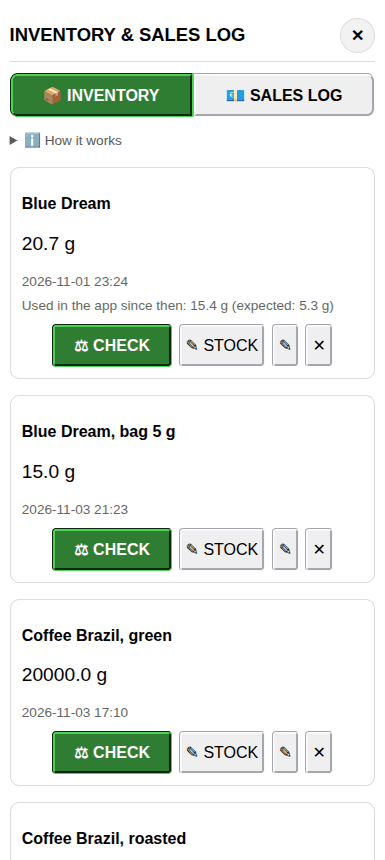
- Up to 250 THINGS in stock, with the empty weight, the full weight of a new one, the volume and the full (sealed) ones on the shelf. You see the content in g, ml and % left, the total and its value.
- ⚖ CHECK or ▶ CHECK ALL: put it on, it saves by itself when the weight is stable, take it off, the next one - a whole shelf in a few minutes. Is a weight far off? The app asks first.
- The loss: what was used in the app since the last check is subtracted - so you see what should be left and what went missing without the app: over-pouring, spills, drying, mistakes.
- You choose what counts as used: the bookings of the sales modes (on by default), every ∑ of the weighing modes (a kitchen) and the recipes, solutions and compounding batches.
- ✎ STOCK for what you can't weigh: type in what is left, marked as typed in by hand. Every check keeps who did it.
- Saved on the scale: several phones and users pour from the same bottle and still see the same numbers. Export it as CSV.
Manual: inventory, for bars, for cannabis shops
Lots and batches - kept on the scale FREEPRO
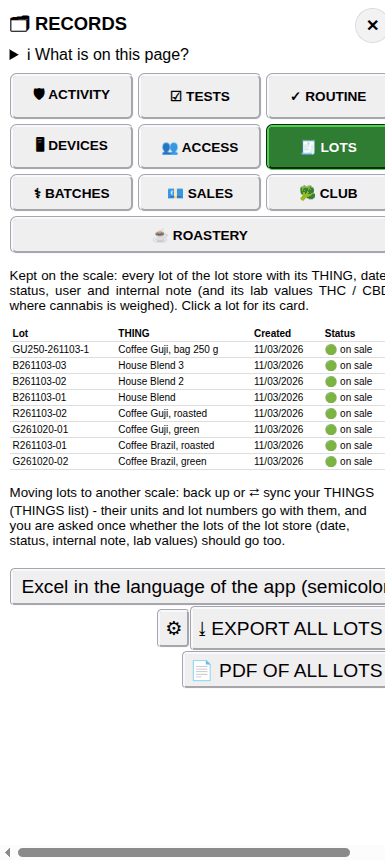
Every THING can carry a lot number - typed in or scanned (also GS1 codes). It goes into every line of the log, onto the labels and into the recipes and reports. With PRO the scale keeps a lot store of up to 420 lots, the same for every phone.
- Number generator: a pattern like
{T3}{YY}{MM}{DD}-{N3}- the first letters of the product, the date and a counter per day or per product. The scale counts, so two phones never get the same number. - Every lot keeps who made it and when, a status, a use-by date, its own price and an internal note (origin, supplier, best before).
- Several lots on sale at the same time: choose the lot when you load the product; a sold-out lot is set "not on sale".
- ⛔ Lock a blocked or recalled lot: it stays in the store and shows as locked everywhere. An expired lot asks before it is used.
- The lot code on the label (a small QR code) opens a page with the lot, the product, the date and your business on any phone - and our app loads the product with this lot.
- The trace: in the roastery a bag leads to its roast batch, the blend to its parts, the roast to its green lots. For cannabis, a lot can have its own lab values THC / CBD - only shown where cannabis is weighed.
- All lots as a list, a CSV file or (ENTERPRISE) a sealed PDF. Nothing is ever overwritten: when the store is full, new lots are refused - traceability first.
Manual: lot number, lot store, use-by date, price of a lot, lot code on the label
Fill weighing: from the bulk to the bag TRY 14 DAYS FREEPRO
Fill your bags one by one out of a bulk THING - roasted coffee of one batch, flowers of one harvest, tea, nuts, spices.
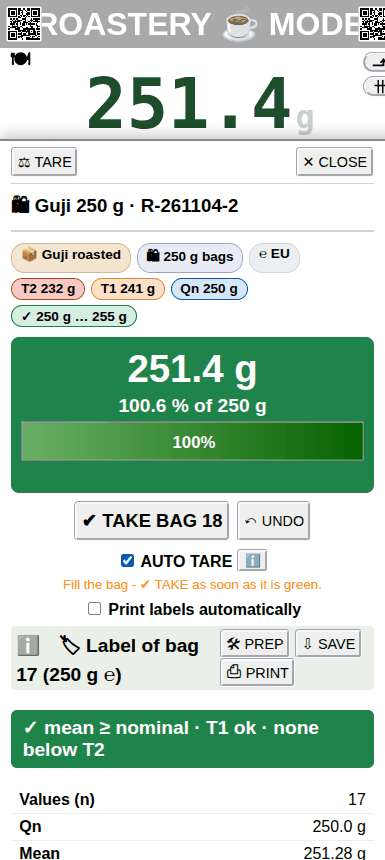
- Setup in a minute: the bulk THING and its batch, the bag size (250 g, 500 g, 1 kg ... or your own) and the tolerance: the ℮ rules of the EU, the US rules of NIST Handbook 133 or your own − / +.
- The box shows the colour: yellow (fill on), green (OK), red (too much). AUTO TARE tares every empty bag by itself; ✔ TAKE BAG takes the stable weight.
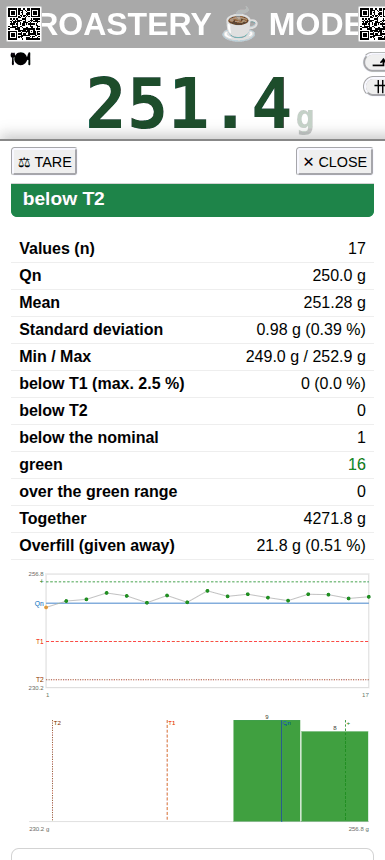
- Statistics with every bag: mean, standard deviation, min / max, the ℮ limits - and the overfill you give away, in g and %.
- A label for every bag with the ℮ mark and the nominal, the price of the bag and the lot of the batch - printed by itself at every TAKE if you like.
- ✔ FINISH moves the weight in the stock: out of the bulk THING, into the bag THING (e.g. 12 × 250 g). Then you sell the bags by number.
Fill weighing watches the bags while they are still open. The ℮ prepackage control of the closed bags is its own step, with its lot report: ℮ prepackage control.
Manual: fill weighing, roastery mode, fill weighing in the club
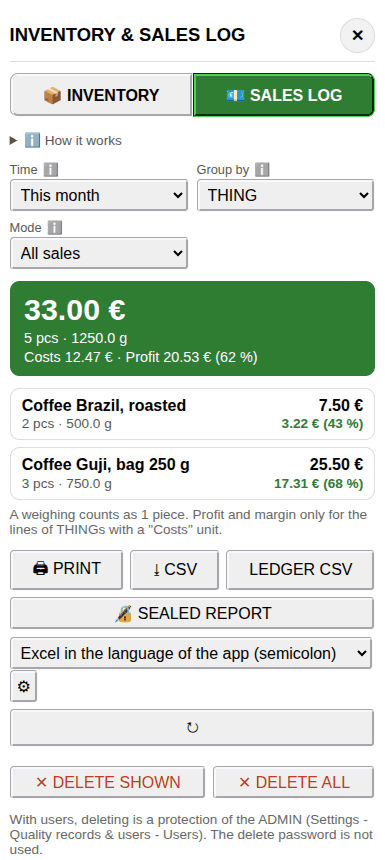
The sales log: what you sold - and what you earned TRY 14 DAYS FREEPRO+ ENTERPRISE
Every booking of the sales, club and roastery modes is added up on the scale - 366 days, the same for every counter.
- Today, the last 7 days, this month, this year or your own range - by THING, day, user or every single sale.
- Pieces, weight, revenue, costs, profit and margin (with a "Costs" unit on the THING).
- Print it or save it as CSV for your bookkeeping. With ENTERPRISE: the sealed report for an inspection - every sale numbered, chained and checked by the scale.
- A weighing just to look is no sale: only the bookings of the sales modes count.
Manual: sales log, your sales computer, sales mode
How others use it
🍸 A bar
Every bottle with its empty and full weight. The drinks are poured with the cocktail mode, so the app knows what was used. At the end of the shift: CHECK ALL - the ml left in every bottle, the value of the shelf and what was over-poured.
☕ A coffee roaster
The green coffee comes in with its lot, the roast becomes a batch, a blend keeps its parts. The fill weighing puts the batch into 250 g bags with an ℮ label - and the trace goes from the bag back to the green lot.
🛒 A shop or deli
Jars and sacks in stock, the lot and the use-by date of the supplier on every product, price labels with the lot code. The sales log shows the margin of every product.
🌿 A cannabis club or dispensary
The harvest gets a lot with its lab values, the jars are in stock, every dispensing is booked. The check shows what was given out, what should be left and what "evaporated" while drying.
🍲 A kitchen or bakery
Flour, sugar and butter in stock, the recipes take what they use. Every ∑ or recipe run counts, and the lots of the ingredients go into the batch report.
The limits - honestly
- No merchandise management: no orders, no suppliers, no delivery notes. The stock counts your THINGS by weight (and the full ones) - up to 250 on a scale, 420 lots, 366 days of sales.
- Not a fiscal cash register: the sales log is your own record. Your cash register stays for the payment and the receipts.
- Selling by weight to the public: in the EU the scale, its display and its printer have to be verified - the app is not. Weigh the customer's goods on your verified scale. Verified scales →
- The stock only goes down in the modes you tick. What is never weighed or booked in the app shows up as a loss at the next check.
More in detail
All jobs in short: For what? · your kind of work: For whom?
Cannabis club documentation (KCanG)
The workflow and a checklist of every record point - done while weighing.
Audit trail & data integrity
21 CFR Part 11, EU GMP Annex 11 and ALCOA+, point by point - with the limits.
Device qualification: clock & storage
No clock in the scale, no WORM disk? Lock the time and the storage of every device - with templates, form and a signed record.
QA guide: introducing it in a regulated environment
The QA tasks, what the app takes over, an estimate of the effort and the steps to the sign-off.
Scale test suite
Every test of OIML R 76-1 Annex A at the scale, with checklist and final report.