⚖
A BRAIN FOR YOUR RS-232 SCALE
The UP↑SCALE firmware turns a small and cheap RS-232 board (sold by TinyTronics) into a complete smart scale adapter including software not only for the private kitchen, but also for entrepreneurs and businesses: plug it into the RS-232 port of your scale, control it wireless with our free app from your phone, tablet or computer and work with 30+ professional, guided weighing programs and 100s of more options and functions from now on!
BOARD (ABOUT 13.50 EUR)
+ PRO FOR A YEAR 46.90 EUR
= about 60 EUR
PRO OR ENTERPRISE: ONCE - NO SUBSCRIPTION - NO ADVERTS - NO CLOUD - NO ACCOUNTS - NO TRACKING - WORKS OFFLINE FOR EVER - AND TEST FOR FREE!
How it works
From a plain scale to a smart one in 20 minutes. Try everything for free, update to PRO or ENTERPRISE once, when you like it.
Get the board
Order the ESP32-C3 RS232 Adapter (sold by TinyTronics, for about 13.50 EUR) and plug it into the RS-232 port of your scale.
Install the firmware
Connect it to your computer and install our firmware with one click in the browser - on the install & update page.
Open the app
Open the UP↑SCALE PWA (our browser based app using Bluetooth LE for connectivity) on your phone or computer. And that's it!
⚖
WHAT YOUR SCALE LEARNS
Keep the scale you trust - add 40+ jobs it never had.
All of it runs on this adapter, with the scale you already have. What it means for your work: packers, shops, cannabis clubs, labs, bakeries, coffee roasters, bars ...
- Weigh & count
- Weighing Scale Price-calculating Scale Counting Scale Multi-Scale Counting System Multi-Interval Scale Multi-Range Scale
- Check, sort & fill
- Control- & Checkweighing Scale Statistics Station ℮ Prepackage Control Sorting Scale Fillweighing Scale
- Sell & keep stock
- Label Station Sales Computer Inventory Scale Lot & Batch Numbers Cannabis Club Records Cannabis-, Weed-, 420 Scale
- Kitchen, food & drinks
- Kitchen Scale Recipe Scale Baking Scale Nutrition Scale Nutrition Diary Scale Diabetic Scale Edibles & Infusion Calculator Coffee Scale Coffee Roastery Scale Cocktail Scale
- Lab, test & measure
- Laboratory Scale Standard Solution Scale Pharmacy Compounding Scale Pipette Check & Calibration Scale Test Suite Audit Trail & Sealed Records Device Qualification Density Scale Drying & Tracking Scale
- Connect
- Connected Scale Smart Scale
Every job explained: FOR WHAT? · products and units: THINGS & UNITS · your kind of work: FOR WHOM? · offline, no adverts, no subscription needed: FOR GOOD!
Your RS-232 scale in the app
Set up once (or let AUTO-DETECT find baud rate and format) - then statistics with Cp/Cpk and the ℮ check with its 3 rules, with the weight of the scale you already have.


More about the app, with all screenshots →Screenshots of the real app with demo values - a screenshot may show the look of an older app version.
RS-232 adapter: questions and answers
Which scales work with the RS-232 adapter?
Any scale with an RS-232 port, from ultra-micro balances to weighbridges, also multi-interval scales and verified trade scales. Presets for METTLER TOLEDO, KERN, OHAUS, A&D, ADAM, SARTORIUS, RADWAG, SHIMADZU, CAS, DINI ARGEO, RICE LAKE and more; AUTO-DETECT finds the type, baud rate, format, unit and step by itself.
Is this an RS-232 to Bluetooth adapter?
Yes - an RS-232 to Bluetooth LE adapter made for scales: it reads the weight from the serial port of your scale and sends it encrypted to the UP↑SCALE app on phones, tablets and computers, several at once. It also works over USB, and your own programs can get the weight through the documented protocol. All the connections.
What do I need to start?
The ESP32-C3 RS232 Adapter (sold by TinyTronics, 13.50 EUR), a USB-C cable and power. Install the firmware with one click in the browser, plug the board into the RS-232 port of your scale and open the app - about 20 minutes.
Does the adapter change my verified, legal-for-trade scale?
No. It sends only what the keys of your scale do (tare, print) over its protective interface - with LISTEN ONLY, for a scale without one, never a byte - and EXACT WEIGHT shows the weight exactly as the scale sends it, with its stable mark. The display of your verified scale stays the legal reading.
What is free, and what does PRO cost?
Free for ever: weighing, prices, counting, simple check-weighing, recipes, labels as an image, the connections and 1 extra scale. PRO costs from 4.43 EUR a month, 46.90 EUR a year or 119.90 EUR once; ENTERPRISE & COMPLIANCE from 13.00 EUR a month or 599.00 EUR once. Prices incl. VAT.
Can I use the adapter for Metrc in a US dispensary?
Yes, for the CSV files - on the C3 board today: plug it into your NTEP scale, and the METRC (DISPENSARY) MODE (PRO) books weigh-outs, harvest weights, waste and the stock check of every Metrc package while you weigh and writes the CSV files for the Metrc upload. The display or ticket of the NTEP scale stays the legal reading. More: Metrc scale for dispensaries. Metrc is a trademark of Metrc LLC. UP↑SCALE is not affiliated with or endorsed by Metrc LLC.
Do I need a PC or internet at the scale?
No. The board is powered over USB-C and talks to your phone, tablet or computer over Bluetooth - or, on a computer, over the USB-C cable. It never needs the internet.
Who sells the board?
The board is sold by TinyTronics; we sell the firmware licence for it. The same firmware also runs on a self-built adapter.
⚖
LEGAL FOR TRADE
Your verified scale + our app = ℮, labels, statistics!
- The smart upgrade for verified scales
- Plug the adapter into the RS-232 port of your verified, legal-for-trade scale: it gets ℮ prepackage control, statistics, labels, a sales log and all the rest - and stays exactly what it is.
- Only the keys - or LISTEN ONLY
- The adapter sends only what the keys of your scale do (tare, print) - or never a byte with LISTEN ONLY, for a scale without a protective interface. more
- EXACT WEIGHT
- The app shows exactly the weight of your scale, with its stable mark - also big on a second screen (no verified customer display). more
- EXTRA LINE
- The alibi number of your scale on your label. more
- 🔏 LEGAL MODE: an alibi memory for any balance (ENTERPRISE)
- Every value that is used is stored first, with the line of your balance and its own number - also without an alibi memory in the balance. more
- And what is legal?
- The display of your verified scale stays the legal reading. What that means for labels and receipts · LEGAL FOR TRADE in the manual
⚖
WORKS WITH ALL RS-232 SCALES
Plug it in, choose your scale - done.
The adapter has an RS-232 port for your scale and a USB-C port for power. Then connect wireless with your phone or laptop - or, on a computer, over the USB-C cable itself (🔌 app on the USB cable, no Bluetooth needed).
- Any scale with an RS-232 port
- RS-232 Serial Port:
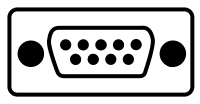
- If your scale has a port like that - then no worries, the adapter will work with it! Independent of the capacity and precision of your scale - from ultra-micro balances to weighbridges - we will make it smart and mobile!
- Every kind of scale, from micrograms to tons:
- You type in the smallest step d of your scale - 1, 2 or 5 × 10n, like the data plate says: 0.1 µg (ultra-micro balances, 100 ng steps), 1 mg, 0.01 g, 0.2 g, 5 g, up to 20 kg and more (weighbridges, truck and crane scales, up to 500 kg steps) - and the maximum load. Multi-interval and multiple-range scales (up to 3 ranges, like a shop scale with 2 g steps up to 6 kg and 5 g steps up to 15 kg) work too: the adapter and the app round every weight to the step of its range, exactly like the scale. The weight units now also include mg, µg and tonnes. Scales with more than 4 million steps (e.g. 2.1 g in 0.1 µg) deliver every digit in EXACT WEIGHT mode. All of it is saved per scale profile, so one adapter can move between a fine balance and a floor scale.
- Presets & auto-detect:
- Select the maker of your scale - METTLER TOLEDO (MT-SICS, PM), KERN (KCP), OHAUS, A&D, ADAM, SARTORIUS (SBI), RADWAG, SHIMADZU, CAS, DINI ARGEO, RICE LAKE, TOLEDO CONTINUOUS, YAOHUA, the US protocols SMA and NCI, or ESC p (many other balances), and price-computing scales (CHECKOUT DIALOG 02, CAS AP-1, TVP, NCI PRICE, AVAWEIGH: the price of the scale comes with the weight) - and the adapter speaks its protocol: it starts the weight stream or asks for the weight by itself, and skips error and overload answers. You don't know the protocol or the baud rate? Press 🔍 AUTO-DETECT and the adapter finds the type of your scale, the baud rate, the data bits and parity, the unit and the d by itself, in up to 40 seconds.
⚖
PAY ONCE - NOT EVERY MONTH
Over five years one scale costs you about 133 EUR with PRO LIFETIME (no subscriptions, no further costs!) - about 13.50 EUR with the free version - the usual adapters, prepackage apps, cloud services and statistics subscriptions cost 270 EUR to 8,000 EUR and more for one job each - and more costs every future month! See the comparison
⚖
FREE AND PRO
Free for ever: weighing, prices, counting, simple check-weighing, recipes, labels (as an image), the connections and 1 extra scale - and every PRO and ENTERPRISE function for 14 days with the free trial. PRO (from 4.43 EUR a month, 119.90 EUR once) adds the PRO modes, the sales mode, ℮ control, reports, CSV exports, label printing, ESP-NOW devices, more scales and the big memory - enough for most businesses. ENTERPRISE & COMPLIANCE (599.00 EUR once) adds the proof: the seal with sealed, checkable reports and exports, users, audit trail - the compounding assistant for pharmacies and labs and the pipette calibration along ISO 8655-6 (the quick pipette check is PRO). Once, for ever, offline. What is in which version
⚖
HOW TO GET IT
5 simple steps
- Buy the board: the ESP32-C3 RS232 Adapter at TinyTronics (about 13.50 EUR + shipping).
- Install our free firmware from your computer - see first install below.
- Try it: connect it to your scale and open our app. The free version runs as long as you like.
- Get your licence (only when you want more): order the PRO licence (from 4.43 EUR a month, 46.90 EUR a year or 119.90 EUR once, incl. VAT) with the Device ID of your board. To find it: connect the board in the app, tap the bar ⭐ FREE VERSION - GET PRO at the bottom of the screen (or ☰ → ✰ SCALE INFO): the 💎 licences & prices page (and the card 🔑 LICENCE of the scale info) shows the Device ID (12 characters), and the ORDER keys open the order form with it already filled in. Nothing is shipped.
ENTERPRISE & COMPLIANCE (from 13.00 EUR a month, 144.00 EUR a year or 599.00 EUR once, incl. VAT; 14 days free to try in the app): everything of PRO plus the sealed, checkable reports and exports (anybody can verify them), the final report of the test suite for inspectors and service technicians, the equipment register, users with login and activity log, report extras and exports in your format. - Activate: you get a link and a QR code by email - open the link or scan the QR code in the app (see activate PRO). Done: your licence is active on this board.
UPCOMING: a 3D-printable housing (free STL download) and a printed housing to order.
You are a maker, or the board is sold out? BUILD YOUR OWN from an ESP32-S3/C3 board and a 3.3 V RS-232 board - same firmware, same licence price.
⚖
FIRST INSTALL
Step by step, in your browser - about 5 minutes
- What you need
- A computer (Windows, macOS, Linux or a Chromebook) with Chrome, Edge or Opera - phones and tablets can not install firmware. A USB-C data cable: many cables that come with chargers only charge and carry no data. If the board is not found at all, try another cable first. No driver and no program to install: everything runs in the browser.
- Plug in the board: connect the USB-C port of the board to your computer. The DB9 plug does not need to be connected to the scale for this.
- Open the update page: up-scales.com/update/?scale=diy&board=323 The newest version is on top (marked as the latest one).
- Click INSTALL at the newest version. The browser opens a window with the serial ports: choose the port of the board - it is the one that appears when you plug the board in (often called "USB JTAG/serial debug unit", on Windows a COM port, on macOS/Linux usbmodem/ttyACM). Click Connect.
- No port to choose, or "failed to connect"? Put the board into download mode: hold the BOOT button, press and release the RESET button (the other button), then release BOOT. Click INSTALL again and choose the port.
- Erase: the installer asks whether to erase the device. On a new board you may tick it (there is nothing on it to keep). Click Next, then Install.
- Wait until it says "Installation complete" (about 1 minute). Do not unplug the board while it installs.
- Start the firmware: press RESET once (or unplug the USB-C cable and plug it in again). Close the installer window. Now plug the adapter to your scale, if you have not done already.
- Open the app (up-scales.com/app, on any computer, phone or tablet with Chrome, Edge or Opera - on the iPhone in Safari with the free beacio extension, on the iPad with the Bluefy browser) and click CONNECT. Choose "UP↑SCALE (DIY) #...". The free version runs - now connect your scale. No scale in the list? See app setup & help.
- It does not work?
- No port in the list: another USB-C cable (a data cable), another USB port of the computer, then download mode (step 4). On Linux your user needs the right to use serial ports:
sudo usermod -a -G dialout $USER, then log out and in again. - "Port is busy" / "failed to open": another program uses the port (our app in another tab, the Arduino IDE, a serial monitor): close it and try again.
- The app does not find the adapter after the install: press RESET once more (or plug it in again), and wait 5 seconds. Bluetooth must be switched on in the settings of your phone or computer.
⚖
ACTIVATE PRO
- Find your Device ID: in the app, with the adapter connected, tap the licence (FREE) at the top of the ☰ menu - the 💎 licences & prices page - or open ✰ SCALE INFO: both show the Device ID (12 characters), and every ORDER button fills it into the order form.
- Order: tap ORDER at the PRO package there - the order form opens with your Device ID already filled in. Or open the order form and type it in.
- Pay: by card right after the order (also Apple Pay / Google Pay). Your licence comes at once, on the page and by email: a link and a QR code.
- Activate: connect the adapter in the app. Then open the link on the same phone/computer - or tap 📷 SCAN in the LICENCE card of the scale info and scan the QR code (or PASTE KEY behind ⋯ and paste the key from the email). The app sends the key to the adapter, which checks it and switches to PRO. Done: PRO forever on this board, on every phone and computer that connects.
Lost the email, or the board was erased? The app remembers the key and sends it again by itself. A phone or computer that does not know the key yet asks you when the board was PRO before and is free now (erased) whether to look it up on up-scales.com (or tap 🔎 FIND MY LICENCE ONLINE in the LICENCE box) - only with your OK, and only the Device ID is sent. The app never contacts our server for this by itself. Without internet: the lost licence page shows it again on any device.
⚖
UPDATES
New firmware versions are free. The app tells you when there is one ("UPDATE YOUR SCALE"), and the update page lists all versions with what changed.
- Close the app (or disconnect the adapter in it), and connect the board by USB-C to your computer.
- Open the update page (UP↑SCALE DIY), click INSTALL at the newest version and choose the port of the board (download mode is usually not needed for updates).
- Erase: do NOT tick it for an update - an erase deletes everything on the board: your RS-232 settings, THINGS and recipes. (Your PRO licence comes back by itself: the app sends it again when it connects, or - if it does not know it yet - offers to look it up online - or use the lost licence page.)
- Wait for "Installation complete", press RESET (or plug it in again), connect it in the app - done.
Please also keep the app up to date: the app shows when a new version is ready - one click on its message installs it.
⚖
CONNECT YOUR SCALE
The adapter has a DB9 male plug, wired like the port of a PC and mechanically designed to behave like a standard computer (a DTE device) or a direct dongle. (pin 2 RX, pin 3 TX, pin 5 GND, RTS on pin 7 is switched on). Plug it in where the PC cable of your scale would go.
- Scenario 1: Male -> Female
-
The scale has a DB9 Female port (Most Common): If the scale is configured as a standard peripheral (DCE device) with a DB9 female connector, you do not need a cable at all.
- The Solution: You can plug the board's DB9 male connector directly into the scale's port as a dongle.
- If you need extension distance: Use a standard DB9 Straight-Through Cable (Female-to-Male).
- Scenario 2: Male -> Male
-
If your scale also has a DB9 male port, then it is likely wired similarly to a computer interface (DTE). Connecting two DTE devices requires swapping the transmit (TX) and receive (RX) channels.
- The Solution: You will need a DB9 Null-Modem Cable (Female-to-Female) or a standard female-to-female straight cable paired with a Null-Modem Adapter. If you prefer to plug in the board directly as a dongle, then get a DB9 Female to Female Null Modem Adapter for just a few EUR!
- No weight in the app?
- "No signal at all" (shown by the auto-detect): switch on the interface of your scale in its menu (many scales need "continuous output", some send only with the print key). If it is on, the wires are crossed the wrong way for your scale: use (or don't use) a null-modem adapter or cable.
- "Data, but unreadable": choose the preset of your scale, or set baud rate, data bits and parity by hand (see the manual of your scale).
- Wrong values: check the preset, the decimals and the capacity in the RS-232 settings.
⚖
WHY THIS ADAPTER?
- A fraction of the usual price
- The interfaces scale makers sell (USB, network, bluetooth) often cost 150-440 EUR - and come without any software: you still need a PC and a program for hundreds of euros, or a monthly subscription. Here the app is included: weighing, counting, check-weighing with statistics and ℮ lot checks, recipes, labels with barcodes, sales log and inventory - on your phone, tablet or laptop. See the costs over five years.
- Try everything first
- With other solutions you pay before you know whether they work with your scale. Here the board is the only risk: install the free firmware, connect your scale, and try every PRO and ENTERPRISE function with your own products for 14 days. Buy PRO only when you need it every day.
- Test your scale yourself
- The test suite runs the tests of OIML R 76-1 Annex A (or NIST HB 44 in the USA) on your scale (also a verified one) - the adapter guides the steps and judges the values itself, every connected device sees the same test - the routine check takes a minute a day - and for inspectors and service technicians there is a final report, the scale calibration along EURAMET cg-18 with certificates of their lab, and the service documents for the legal metrology (ENTERPRISE). One adapter for several scales: scale profiles. All tests in detail
- Several scales, several devices
- Use several scales in one program (kilos of flour on the platform scale, grams of salt on the fine scale) and control one scale from several phones and computers at the same time - they all see the same data.
- Your data stays yours
- Products, recipes, stock and sales are saved on the adapter itself. No account, no cloud, no tracking, no advertising - and it works offline, also as a single file. On PRO and ENTERPRISE it is a Cryptographic Serial-to-Bluetooth Data Bridge: everything over Bluetooth is encrypted.
⚖
GET YOUR PRO LICENCE
⚖
ANY MORE QUESTIONS?
Write us an e-mail at  , or contact us at instagram. More about the app: ↑⚖ APP MANUAL.
TinyTronics is our logistics partner: they sell and ship the board, we sell the software licence only. UP↑SCALE is not affiliated with LEOTRO. Product names belong to their owners.