UP↑SCALE › BUSINESS & PRODUCTION › PACKING & PRODUCTION › COUNTING & CHECK COUNTING
Counting scale app: count pieces by weight and check the count
Screws, washers, labels, small parts: UP↑SCALE turns the scale you have into a counting scale. Weigh a few pieces once, and the app counts the rest - with a piece weight that gets more exact by itself, on one scale or on several at once.
- Piece weight typed in or from a sample
- Optimised by itself while you add pieces
- Sample on a fine scale, bulk on a big one
- Positive and negative check counting
In short
UP↑SCALE is one scale app for the scale you already have. Its counting mode counts pieces by weight: the piece weight comes from a typed value or a sample, gets more exact by itself, can come from a finer second scale, and several scales can count together into one total. For workshops, shops and packers. Counting is free; check counting and more extra scales need PRO, from 4.43 EUR a month or 119.90 EUR once.
Count pieces in three steps FREE
Start 🔢 COUNTING in the app. The scale needs to know what one piece weighs - you give it in one of two ways, and from then on it counts.
- ⌨ By direct insert: you know the weight of one piece? Type it in.
- ⚖ Or weigh things: put a known amount on the scale - say 10 of the screws you want to count - and type how many they are. The scale works out the piece weight.
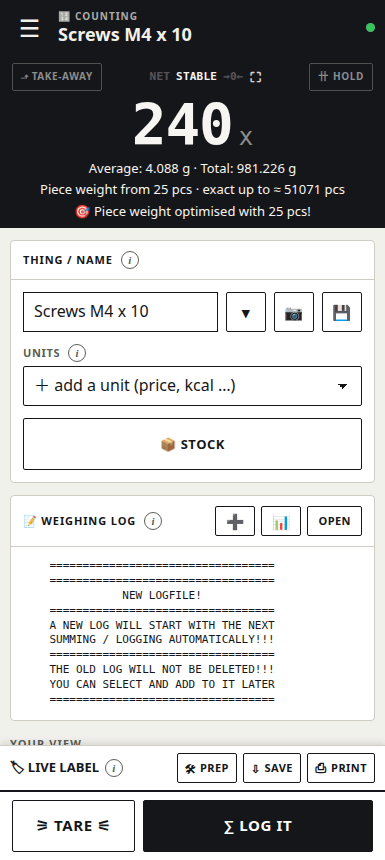
- Now the pieces are the big number in the display; below it the average and total weight, where the piece weight comes from and up to how many pieces the count is exact.
- ∑ LOG IT writes the count into the log, the 🏷 label carries it, and the units of your THING follow it per piece - a price per piece, mg, kcal or whatever you count in.
More exact with every piece
A count is only as good as its piece weight. Like professional counting scales, the scale improves it while you go on - and tells you how far you can trust it.
- Piece weight optimisation: after the sample (e.g. 10 pieces) simply add more - up to 3 times the sample. As soon as the count is stable for a second and surely exact, the scale takes it as the new sample ("🎯 Piece weight optimised with 25 pcs!") and goes on.
- Safe from mistakes: the optimisation ends as soon as you take pieces away, tare or log - a container or the take-away mode never changes the piece weight. A piece weight you typed in is never changed.
- Exact up to …: the display shows up to how many pieces the count is exact ("exact up to ≈ 870 pcs"), worked out with the precision of your scale.
- Two warnings: pieces that are very light for the scale (less than 10 digits each, e.g. under 1 g on the 420) - use a bigger sample or a finer scale; and more pieces than the exact range - count a bigger sample or let it be optimised.
Manual: piece weight optimisation
Sample on the fine scale, bulk on the big one
Reference counting with two scales
Connect a fine scale as an extra scale and start counting on the big main scale. Put the counted sample on the fine scale, type how many they are and press USE ⚖2: its stable weight divided by the pieces becomes the piece weight of the main scale ("Piece weight from ⚖2 … (50 pcs)"). The finer the scale, the more exact the count of the whole bin - like the counting systems in industry, without cables.
Count on several scales at once
With more scales connected, all of them count together: every scale shows its own weight and pieces small on top ("⚖1: 409.2 g = 100 pcs"), the big number is the sum of all - and so are the totals, the label and the log. Move pieces from one scale to another: the sum follows live. Each scale is rounded to whole pieces on its own, so the rows always add up to the big number.
Example: 5,000 screws in three bins
Count 50 screws on the fine scale and press USE ⚖2. Fill the three bins on three scales at the same time and watch the big number grow to 5,000. Print the label with the count and the price of all of them, log it - without counting one bin after the other.
Count what you take out - and hold the count
- ↰ TAKE-AWAY: put the full box on the scale and switch on the take-away mode: the scale counts the pieces you take out and still shows what is left.
- 卄 HOLD: holds the pieces of the next weighing (1 click) or of every weighing (2 clicks) - for wobbly loads or when you can't see the display.
- One count on every device: the scale keeps the take-away and the hold, so every connected phone or computer shows the same.
Manual: take-away mode, HOLD
Check counting: is the amount right? TRY 14 DAYS FREEPRO
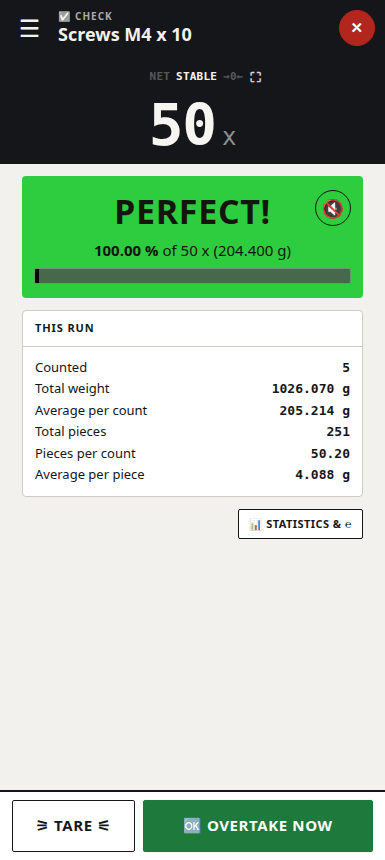
In check counting the scale compares the number of pieces with your target, not the weight. Enter the target in pieces and the weight of one piece - the scale does the rest and shows the result in the weighing colours: orange too few, yellow OK, green PERFECT, red too many.
| Program | What it checks |
|---|---|
| Positive check counting | The pieces you put on the scale - e.g. bags of 50 parts filled one after the other. |
| Negative check counting | The pieces you take off - e.g. counting 50 parts out of a full box without weighing each bag. |
- PERFECT and OK range in percent or straight in pieces ("PERFECT from X up to Y" below the target).
- The difference in percent, pieces and weight, with a bar that fills the last 10 % across its whole width - and a sound, if you like.
- Auto overtake: a PERFECT count is taken after a time you set (once the weight is stable for at least 0.6 s) - or with one tap on 🆗 OVERTAKE NOW. The scale tares and is ready for the next one.
- THIS RUN: how many were counted, the total and the averages, right below the result.
- 📊 Statistics: every counted pack goes into the statistics in pieces - mean, spread, Cp / Cpk, run chart and histogram.
- Extra scales as stations: each one shows TOO LESS, OK, PERFECT or TOO MUCH for the pack on it; the main scale counts and logs.
Manual: check counting, check-weighing options, statistics
Who counts with it
Workshops and manufacturers
Screws, nuts, rivets, small turned parts: count the sample on the finest scale, the bin on the floor scale, and log every count.
Shops and stalls
Sell small items by the piece: the count, the price of all of them and the label come from one weighing.
Packing kits and bags
Bags of 50 or 100 pieces: check counting shows at a glance if a bag is right, and the statistics show how even your packing is.
Stock counts
Count boxes of small parts at the stock-taking in seconds instead of by hand - with the take-away mode also straight out of the box.
FREE and PRO
| FREE | PRO | |
|---|---|---|
| Counting, piece weight optimisation, reference counting, take-away, HOLD | ✓ | ✓ |
| Extra scales that count along | 1 | more |
| Positive and negative check counting | - | ✓ |
| Statistics of the counts | on the screen | + CSV export and reports |
| Labels with the count | saved as an image | printed, also on label printers |
PRO on an UP↑SCALE device: from 4.43 EUR a month or 119.90 EUR once; with your own scale and the virtual scale of the app: PRO VIRTUAL, 89.90 EUR once. Try it first: 14 days of PRO and ENTERPRISE for free. All prices: prices & versions.
Manual: free and PRO
What counting by weight can't do
- It counts pieces of the same kind: parts that differ much in weight (mixed sizes) can't be counted by weight - sort them first.
- The count is only as exact as the piece weight and the scale: for very light parts count a bigger sample on a finer scale, and keep the bench calm.
- A count is not a weight: for goods sold by weight in front of customers you need a verified scale - see verified scales.
Counting and check counting: questions and answers
How does a counting scale work?
It divides the weight on the scale by the weight of one piece. You give the piece weight once - typed in, or by weighing a known number of pieces, e.g. 10 - and the scale shows the pieces, the average and the total weight from then on.
Can I turn my normal scale into a counting scale?
Yes. The counting mode of the app works with our scales, with your own scale on an UP↑SCALE adapter and with the virtual scale of the app on many Bluetooth and USB scales. Counting is part of the free version.
How do I count small screws by weight exactly?
Use a bigger sample and the finest scale you have: count the sample on a fine scale, press USE ⚖2 to send its piece weight to the big scale, and add more pieces while the scale optimises the piece weight. The display shows up to how many pieces the count is exact.
What is check counting?
Check counting compares the number of pieces with a target instead of the weight, with a PERFECT and an OK range in percent or pieces. Positive check counting checks what you put on the scale, negative check counting what you take off.
Can several scales count together?
Yes. Every connected scale counts with the piece weight of the main scale and shows its own pieces; the big number, the totals, the label and the log are the sum of all scales. One extra scale is free, more with PRO.
Is the counting mode free?
Yes: counting with piece weight optimisation, reference counting with 1 extra scale, the take-away mode and HOLD are free. Positive and negative check counting, more extra scales, printed labels and the CSV export are PRO, from 4.43 EUR a month or 119.90 EUR once.
Also useful for you
Inventory, lots & bags
Business & productionStock by weight with the loss, a lot number generator and store, fill weighing into bags and the sales log - on the scale.
Read →Labels & printing
Business & productionPrice, QR and allergen labels from your scale: as a picture for free, on any printer or label printer with PRO.
Read →Shops, market stalls & farm shops
Business & productionWeigh, price, label and book in one step. The sales log lives on the scale - by day, product and user.
Read →Owners of verified trade scales
Business & productionKeep your legal-for-trade scale exactly as it is - and add everything it never had. The adapter shows the exact weight of your scale and sends only what its keys do (tare, print) - or nothing at all.
Read →Packing & production: more pages
Packing & production
Business & productionScale software for packing tables and workshops: prepackages filled and checked along the ℮ rules with statistics and labels, parts counted and sorted by weight.
Read →Food producers & packers
Business & productionFill, check and label your packs on the scale you already have - with the statistics and the ℮ lot report the inspector wants to see.
Read →℮ prepackage control
Business & productionThe 3 packers' rules, the sample plan, T1 / T2 and the lot report, step by step.
Read →Manufacturers & workshops
Business & productionCount parts on several scales, sort by weight, fill molds and drive your filling machine with a cut-off that learns.
Read →Several scales at once
Business & productionExtra scales in the same app: each with its own weight and tare, the sum of all in the middle - over Bluetooth or WiFi.
Read →Filling machines
Business & productionThe factory mode fills molds and bags cavity by cavity; the scale stops your machine early over ESP-NOW and learns its lag.
Read →Weighing log & statistics
Business & productionLog every weighing with sums and averages, then see mean, standard deviation, Cp / Cpk, run chart and histogram of a series - plus combination weighing.
Read →The same app, for other work
Every function is in the same app - at home, in business and in the lab. All functions at a glance.