UP↑SCALE › LABORATORY › LABORATORIES & PHARMACIES › LIMS, DATA & IT › TRACKING MODE
Tracking mode: your scale as a weight data logger with alarms
The tracking mode of UP↑SCALE records the weight at a fixed interval - every 0.25 seconds up to once a day, for minutes, days or weeks. Follow a drying curve, the water use of a plant or a silo running empty, get an alarm when a target is reached or something is taken away, and send every point to your own website.
- A point every 0.25 s up to once a day, for days or weeks
- Records by itself, also with the app closed
- Alarms: target, constant weight, jump, limits
- Webhook, LIMS forwarding and your own website
In short
UP↑SCALE is one scale app for the scale you already have. Its tracking mode turns the scale into a weight data logger: it records the weight at a fixed interval, shows drying curves and the rate of change, raises alarms when a target is reached or the weight jumps, and sends every point to your own server. For labs, makers, growers and businesses. Try it for free (15 minutes at a time); PRO from 4.43 EUR a month or 119.90 EUR once records without limits.
What you can track with a weight data logger
Everything where a weight changes over time - or should not change at all.
Drying & curing
Herbs, flowers, fruit or wood: see the drying curve and the water that is gone. The drying preset sets the target from your dry matter and the final moisture you want (e.g. 10-12 %), shows the estimated moisture live and can stop the run when it is reached.
Evaporation & constant weight
Loss on drying of a sample, an evaporation test, a coating that dries: the constant weight alarm says "done" when the weight changes less than your value within your time - like a drying balance, with the heat from your own oven or room.
Dough, fermentation & starter
Weigh a fermentation, a sourdough starter or a dough over night: the rate chart shows when the change slows down, the daily summary what happened while you slept.
Plants & beehives
A plant pot loses water every day - a LOW limit tells you when to water, the jump alarm records every watering. A beehive on the scale shows the honey flow and the day and night rhythm over weeks.
Silo, tank & reorder level
A LOW and a HIGH limit with a hysteresis: one alarm when the stock falls to the reorder level, no new ones while it hovers there. With Zero Memory a silo that always stays on a load-cell scale keeps its weight over a power cut.
A weight sensor for movements
Something taken away, put on, knocked over or refilled: the jump alarm reacts to every change bigger than your value from one point to the next - with points every 0.25 seconds within a moment. With ESP-NOW it switches a buzzer, a lamp or a relay of your own.
How a tracking run works
- Tare the container (a tray, a pot, a jar), put the item on it and choose TRACKING MODE in the ☰ menu (⚖ MODES).
- Name and interval: one point every 0.25 seconds up to every 24 hours. The page shows how long the full detail lasts (8000 points, e.g. 5.5 days at one point a minute). An optional start delay leaves out the first movements.
- Target and alarms - or the 🌿 drying preset, which works out the target for you. Then START TRACKING.
- The scale records by itself: each point is the mean of the shown weight over its interval, so a short bump or a breeze does not count. Close the app, take your phone with you - when you connect again (with any device), the app loads all points from the scale.
- The end: ■ STOP, or the auto stop at the target or the constant weight. The result goes into the log with start, end, change, lowest and highest weight and the events.
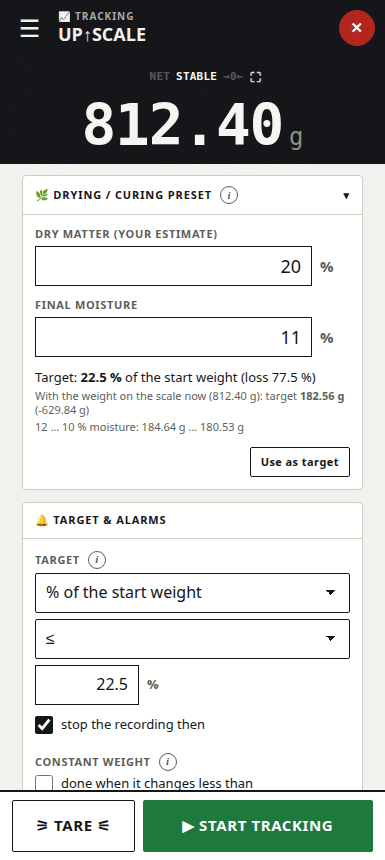

Manual: start a run, drying preset, the result
Weight change alarms
The scale checks every alarm itself, also with the app closed - at every new point of the run.
| Alarm | When it comes |
|---|---|
| Target | A weight - or a percentage of the start weight (75 % = 25 % weight loss) - reached from above (≤, drying, evaporation) or from below (≥, filling up, growing). Optional auto stop. |
| Constant weight | The weight changed less than your value within your time, e.g. less than 0.2 g within 120 minutes. Optional auto stop. |
| Jump | The weight changed more than your value from one point to the next: watering, something taken away or put on. |
| Peak | Every high or low of at least your value - small wiggles are ignored (e.g. the daily high and low of a plant pot). |
| Average band | The weight went more than your percentage above or below the average of the run - again every time after it was back inside. |
| Fixed limits LOW / HIGH | Your weight with a hysteresis: once at the limit, again only after the weight went back past it by more than the hysteresis (silo, tank, reorder level). |
| Restart | The scale went on after a power cut - the gap is marked in the run. |
- In the app: a red card with the date and time of the point where it happened, with a sound and vibration, until you press OK, SEEN. A page in the background (another tab, the screen off) shows a notification of your system.
- Change them during the run with 🔔 ALARMS in the key row - the run goes on.
- Gross or net: by default the alarms use the weight against the zero of the start, so a TARE during the run causes no false alarm and never stops a run by mistake.
Manual: alarms, fixed limits, system notification, gross and net
Live charts, statistics and export
The run page is live while the scale records and stays as the result after the stop.
- Tiles: the weight now, the change since the start (also in %), the rate of the last hour (per hour and per day), the expected time until the target from the current trend, the estimated moisture of a drying run.
- Weight over time from the whole run down to the last 10 seconds: drag, zoom, the overview strip below it, ▶| Live - with the highest and lowest point, the target line, the average band, peaks, jumps, tares and restarts as markers you can tap.
- Rate of change (when drying slows down, the day and night rhythm of a plant), the zero point of the scale, ⛰ EVENTS, 📅 DAYS (the change per day) and Σ STATISTICS.
- Print and report with all charts, the statistics, the daily summary and the events - also as an interim result while the run records; SAVE AS PDF with ENTERPRISE.
- CSV export of all points with date, time and Unix time - after a tare during the run with the gross and the display weight.


Manual: live view & charts, the result
Long runs, power cuts and memory
- 8000 points in full detail on the scale: 33 minutes at 0.25 s, 22 hours at 10 s, 5.5 days at a minute, 55 days at 10 minutes, 11 months at an hour.
- A full memory does not end the run: two neighbouring points become one and the interval doubles - the whole run always fits, with less detail for the older part. The app keeps every point it got in your browser (the last 3 runs) and uses the finest data there is.
- After a power cut the scale continues the run by itself and marks the gap; at most the points since the last save are missing (max. 15 minutes).
- The time: the app gives the scale the time at the start and every time it opens the run; in the WiFi network the scale can take the time from the network.
Manual: memory, power cuts & time, Zero Memory
Webhooks, LIMS and your own website
The runs can go to a server of yours - every point stored, a live chart on your own website, a CSV and an e-mail at every alarm. Nothing goes to us or to another cloud: you give the address, only your server gets the data.
The scale sends by itself: webhook over WiFi PRO
An UP↑SCALE in your WiFi network posts the start, the stop, every alarm and every point (in batches of up to 16) to your address - with no app open. After a restart or when your server was away, it sends the run again from its first point; your server keeps what it has. Secured with https and a token, HMAC-signed or as a sealed envelope.
Manual: webhook: tracking runs
The app sends: LIMS / ELN forwarding PRO
The scale on Bluetooth or USB, the app open on a phone, tablet or PC: the app sends the same events (start, stop, alarms, points) to your LIMS, ELN or own server. When it connects again after a time without the app, it sends the newest point and the alarms it did not send yet.
Your own website: live chart, CSV and e-mail alarms PRO
A ready-made receiver for your web server - one PHP file, no database, MIT licence - takes the runs from both ways and:
- stores every point of every run and shows a live chart in the browser
- gives a CSV export (and JSON) of every run
- sends an e-mail at every alarm, at your own limits and when a recording scale goes silent
Alarms to your own devices: ESP-NOW PRO
The scale sends the state of the run in every packet and every new alarm at once by radio to another UP↑SCALE device or your own microcontroller - for a buzzer, a lamp or a relay, without WiFi or a server.
Manual: alarms to other devices
Example code (MIT licence)
- Tracking mode on your own website: the guide to the receiver - setup, files, event format.
- The receiver to download:
upscale-tracking-receiver.phpand its Python twinupscale-tracking-receiver.py. - Integration: tracking alarms - the data for your microcontroller and the MasterBlaster sketch with its ALARM_PIN.
- All routes into your systems: receivers in PHP, Python and Node.js, Node-RED and n8n flows, the bridge into your LIMS.
Webhook, LIMS / ELN forwarding and ESP-NOW are PRO; the receiver itself is free code for your own server.
FREE and PRO
| FREE | PRO | |
|---|---|---|
| Recording | 15 minutes in a row, then a pause of 10 minutes (only tracking pauses) | without limits |
| Live view, charts, statistics, alarms | ✓ | ✓ |
| Print, report file, CSV export | - | ✓ |
| Webhook, LIMS / ELN forwarding, ESP-NOW alarms | - | ✓ |
PRO on an UP↑SCALE device: from 4.43 EUR a month or 119.90 EUR once. With your own scale and the virtual scale of the app: PRO VIRTUAL, 89.90 EUR once. Try it first: 14 days of PRO and ENTERPRISE for free. All prices: prices & versions.
What the tracking mode is not
- No moisture analyzer: it does not heat. The estimated moisture is only as exact as your dry matter estimate - dry a small sample completely once to learn your value.
- Not for legal-for-trade weighing: the runs are your own records.
- The virtual scale (the app with another maker's scale) records while the app is open; an UP↑SCALE scale or adapter records on its own.
- The app forwarding sends while the app is open and connected - for runs without gaps on your server use the webhook of the scale over WiFi.
Tracking mode: questions and answers
Can a scale log weight over time by itself?
Yes. In the tracking mode an UP↑SCALE scale or adapter records one point per interval (0.25 seconds to 24 hours) on its own, also with the app closed and after a power cut. When you connect again, the app loads every point and shows the charts.
How do I record a drying curve with a scale?
Tare the tray, put the wet material on it and start a tracking run, e.g. one point every 10 minutes. The 🌿 drying preset sets the target from your dry matter and the final moisture you want, shows the estimated moisture and can stop the run when it is reached. The weight chart is the drying curve; the CSV has every point.
Can I get an alarm when the weight changes?
Yes: target reached, constant weight, a jump between two points, peaks, leaving the average band and fixed LOW / HIGH limits. The scale checks them itself; the app shows them with sound and vibration and as a system notification, and they can go to your server, your e-mail (with the example receiver) or by ESP-NOW to a buzzer or relay.
Can the scale send its data to my own website?
Yes, with PRO. In your WiFi network the scale posts every point and alarm itself through its webhook export; with Bluetooth or USB the app forwards them while it is open. The free example receiver in PHP or Python stores the runs, shows a live chart, gives a CSV and sends e-mails at alarms.
How long can a run last?
As long as you want. The scale holds 8000 points in full detail - 5.5 days at one point a minute, 11 months at one an hour. When the memory is full, two points become one and the interval doubles, so the whole run always fits; the app keeps the full detail it got in your browser.
Does a power cut end the run?
No. The scale goes on by itself after a power cut and marks the gap; at most the points since the last save (max. 15 minutes) are missing. The restart is an alarm and a marker in the chart.
Is the tracking mode free?
You can try it for free: 15 minutes of recording in a row, then a pause of 10 minutes. PRO (from 4.43 EUR a month or 119.90 EUR once) records without limits and adds the CSV export, the report, the webhook, the LIMS / ELN forwarding and ESP-NOW alarms.
Also useful for you
Tracking Mode on Your Website: Live Chart, CSV, E-mail
Send the tracking runs of your scale to your own server: every point stored, a live chart, CSV export and e-mail alarms - with a free PHP example.
Read →Scale Integration: LIMS, Webhook, API & Code Examples
Connect your scale to your LIMS, ELN or own server: webhook, JSON API, streams, MQTT, Modbus, ESP-NOW and machines - with free example code (MIT).
Read →LIMS, ELN & sensors
UP↑SCALE LaboratoryEvery weighing to your LIMS or ELN, room values next to it, air buoyancy corrected.
Read →Connect a Scale to Phone & PC: Bluetooth, USB, RS-232
Connect a scale to phone or PC: Bluetooth, the USB cable or your WiFi network, several scales, scales of other makers, machines, webhook and your own programs.
Read →Makers & developers
Build your own adapter for about 15 EUR, read the open protocol, and connect the scale to your own pages, Arduino and ESP projects.
Read →Who else uses it
Home & kitchen
Home & kitchenThe free Bluetooth kitchen scale app for the scale you already have: nutrition, carbs, recipes, baking, coffee and cocktails - offline, no account.
Read →Manufacturers & workshops
Business & productionCount parts on several scales, sort by weight, fill molds and drive your filling machine with a cut-off that learns.
Read →Filling machines
Business & productionThe factory mode fills molds and bags cavity by cavity; the scale stops your machine early over ESP-NOW and learns its lag.
Read →Cannabis social clubs (Germany)
Business & productionThe KCanG documentation, done while you weigh: harvest, drying, dispensing and destruction on one lot, with member ID and THC / CBD.
Read →Cannabis at home
Home & kitchenWeigh your weed with the mg of THC and the price live, and dose cannabutter and edibles by weight - where it is legal.
Read →Weighing log & statistics
Business & productionLog every weighing with sums and averages, then see mean, standard deviation, Cp / Cpk, run chart and histogram of a series - plus combination weighing.
Read →Lab & pharmacy: more pages
Laboratories & pharmacies
UP↑SCALE LaboratoryThe compounding assistant from master formula to signed batch record, routine checks before use, a full test suite and records you can prove: users, roles, reasons, a hash-chained audit trail and sealed reports.
Read →Small laboratories
UP↑SCALE LaboratoryLaboratory software a small lab can afford: balance records, routine checks, pipettes and an audit trail on the balance you have - no server, no software package per balance, one price per device.
Read →Lab balance tools
UP↑SCALE LaboratoryThe tools at your lab balance on one page: pipette calibration along ISO 8655, the daily balance check along USP <41> and the compounding assistant.
Read →Pipette check & calibration
UP↑SCALE LaboratoryGravimetric pipette calibration along ISO 8655-6, step by step on your lab balance: the scale takes every value, the uncertainty, the CMC, the register.
Read →Affordable pipette software
UP↑SCALE LaboratoryWhat pipette calibration software costs on your own balance, what you get for it - and where a classic package is still the better choice.
Read →Daily balance check (USP <41>)
UP↑SCALE LaboratoryUSP <41> repeatability and minimum weight, Ph. Eur. 2.1.7, trade and HACCP checks in one minute a day.
Read →Compounding assistant
UP↑SCALE LaboratoryThe formula step by step on your balance: every component within its tolerance, the container checked, signed records.
Read →Solution mode
UP↑SCALE LaboratoryPrepare standard and stock solutions by weight on your balance: goals in g, % or parts, a live bar per row - weigh too much and the other goals follow.
Read →Density determination
UP↑SCALE LaboratoryDensity determination on the balance you have: hydrostatic weighing guided step by step, density with uncertainty, tables of metals, gems, wood, plastics.
Read →LIMS, data & IT
UP↑SCALE LaboratoryHow the weighings of your balance reach your systems: LIMS and ELN, room sensors, webhook, JSON API, streams, tracking on your website, Bluetooth, USB, WiFi.
Read →The same app, for other work
Every function is in the same app - at home, in business and in the lab. All functions at a glance.